




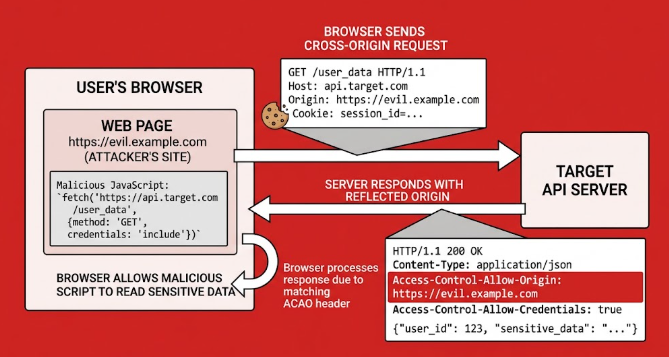
A CORS vulnerability with basic origin reflection is one of the most common API misconfigurations in bug bounty reports. It is also one of the easiest to fix. The server copies whatever Origin header the browser sends into the Access-Control-Allow-Origin response header, and then allows credentials. Any website on the internet can then read authenticated responses from your application.
This guide covers how the flaw works, how to identify it, how it is exploited, and how to fix it properly. It includes a walkthrough based on the PortSwigger Web Security Academy lab.
What Is a CORS Vulnerability With Basic Origin Reflection?
Browsers enforce the Same-Origin Policy (SOP), which stops a page on evil.example from reading responses from bank.example. Cross-Origin Resource Sharing (CORS) is a controlled way to relax that rule. A server opts in by returning headers such as:
Access-Control-Allow-Origin: https://app.example.com
Access-Control-Allow-Credentials: true
The first header names which origin may read the response. The second allows the browser to include cookies in the cross-origin request.
Developers often want to support many origins without maintaining a list. The shortcut is to read the request’s Origin header and echo it back. That is basic origin reflection.
Vulnerable Example
Following example given in JavaScript (Express JS)
app.use((req, res, next) => {
  res.setHeader("Access-Control-Allow-Origin", req.headers.origin);
  res.setHeader("Access-Control-Allow-Credentials", "true");
  next();
});
This code trusts every origin. The cors policy check becomes meaningless, and the browser’s protection is switched off for every site that sends a request.
Hire a Application Security Specialist!
Identify misconfigured CORS policies, validate vulnerabilities, and implement secure origin controls. Clear reports and real fixes.
Why Origin Reflection Is Dangerous
The risk comes from combining reflection with Access-Control-Allow-Credentials: true. When both are present:
- A logged-in victim visits a malicious page.
- The page’s JavaScript sends a credentialed request to your API.
- The browser attaches the victim’s session cookie.
- Your server reflects the attacker’s origin and permits credentials.
- The browser lets the attacker’s script read the response.
The attacker can then steal API keys, personal data, CSRF tokens, or anything else the endpoint returns. Unlike CSRF vulnerability, which only lets an attacker send requests, a CORS flaw lets them read the responses.
How to Identify Origin Reflection
You can confirm a CORS vulnerability with basic origin reflection in a few minutes with Burp Suite or curl.
Step 1: Find Sensitive, Authenticated Endpoints
Look for endpoints that return account details, API keys, tokens, or private records. Examples are /accountDetails, /api/me, and /api/keys.
Step 2: Send a Custom Origin Header
curl -i https://target.example/api/me \
  -H "Cookie: session=YOUR_SESSION" \
  -H "Origin: https://random-test-origin.example"
Step 3: Read the Response Headers
The application is vulnerable if you see access-allow-origin:
Access-Control-Allow-Origin: https://random-test-origin.example
Access-Control-Allow-Credentials: true
Step 4: Test Variations
Some applications validate weakly instead of reflecting blindly. Test these origins as well:
Test Origin What It Reveals null The server trusts the null origin https://target.example.evil.com Suffix or prefix matching is flawed https://eviltarget.example Substring or regex matching is flawed http://target.example Insecure HTTP origin is trusted
A response that only reflects the origin without credentials is far less severe. You can still report it as a misconfiguration, but the real impact appears when credentials are allowed.
Exploitation Overview
Understanding the attack helps you write accurate reports and verify your cors errors. A proof of concept hosted on an attacker-controlled page looks like this:
<script>
  fetch("https://target.example/accountDetails", { credentials: "include" })
    .then(r => r.json())
    .then(data => {
      console.log(data);
    });
</script>
If the victim is logged in to the target and the response is readable, the vulnerability is confirmed. For bug bounty work, always test with your own account and stay within the program’s scope.
Get 20% off on your first hosting purchase. Provide everything you need to create your website.
How to Fix a CORS Vulnerability With Basic Origin Reflection
The fix is to stop trusting the incoming Origin header blindly. These are the controls to apply, in order of importance.
Use a Strict Allowlist
Maintain an explicit list of trusted origins and compare against it using exact string matching.
const allowedOrigins = new Set([
  "https://app.example.com",
  "https://admin.example.com"
]);

app.use((req, res, next) => {
  const origin = req.headers.origin;

  if (origin && allowedOrigins.has(origin)) {
    res.setHeader("Access-Control-Allow-Origin", origin);
    res.setHeader("Access-Control-Allow-Credentials", "true");
    res.setHeader("Vary", "Origin");
  }
  next();
});
If the origin is not on the list, send no CORS headers at all. The browser then blocks the cross-origin read by default.
Avoid Weak Matching
Exact comparison avoids the common mistakes in origin validation:
- Do not use
endsWith(".example.com"). It also matchesevil-example.com. - Do not use
includes("example.com"). It matchesexample.com.attacker.net. - Do not use unanchored regular expressions. Always anchor with
^and$and escape dots.
Never Trust the null Origin
Sandboxed iframes and local files can send Origin: null. Attackers can trigger it deliberately, so allowing it re-creates the same vulnerability. Leave null off your allowlist.
Add the Vary: Origin Header
When the response changes based on the Origin header, add Vary: Origin. Without it, a cache can serve one origin’s CORS headers to another origin and cause unpredictable behavior.
Do Not Combine Wildcards With Credentials
Browsers reject Access-Control-Allow-Origin: * together with credentials, so developers often “fix” the error by reflecting the origin instead. Resist this. If an endpoint is truly public and needs no cookies, use * without credentials. If it needs credentials, use the allowlist.
A cors preflight request is an automatic safety check performed by a web browser before initiating a cross-origin HTTP request.
Use a Maintained CORS Library Correctly
Most frameworks have solid CORS middleware. Configure it with an explicit list, not a callback that returns true for everything.
const cors = require("cors");
app.use(cors({
  origin: ["https://app.example.com", "https://admin.example.com"],
  credentials: true
}));
The same principle applies in Python:
# Flask-CORS
from flask_cors import CORS
CORS(app,
     origins=["https://app.example.com"],
     supports_credentials=True)
Add Defense in Depth
CORS is not an authentication system. Layer these controls on top:
- Set session cookies with
SameSite=LaxorStrict, plusSecureandHttpOnly. - Require authentication tokens for sensitive actions instead of relying on cookies alone.
- Return the minimum data an endpoint needs. If an API key does not need to be shown, do not return it.
- Do not rely on network location. Internal tools reachable from a victim’s browser can be attacked through the victim.
Case Study: PortSwigger “CORS Vulnerability With Basic Origin Reflection” Lab
The PortSwigger Web Security CORS Academy lab on this topic is a good way to practice. Here is the flow.
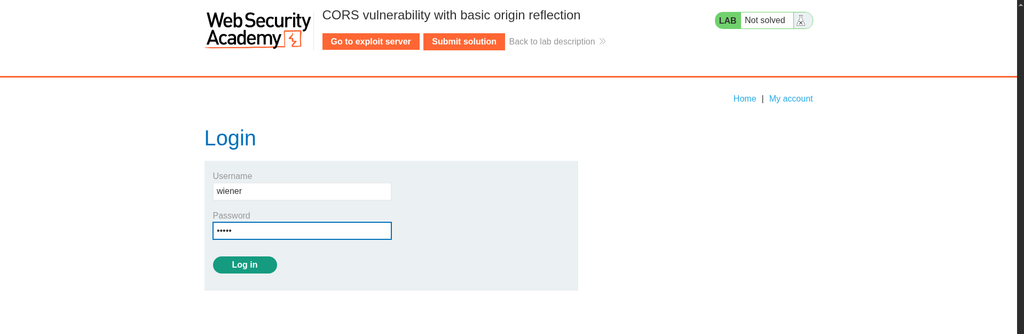
1. Log in to the lab with the credentials provided in the lab description.
2. Proxy the traffic through Burp Suite and open the account page. Find the AJAX request to /accountDetails. Its response contains the account’s API key and the header Access-Control-Allow-Credentials: true.
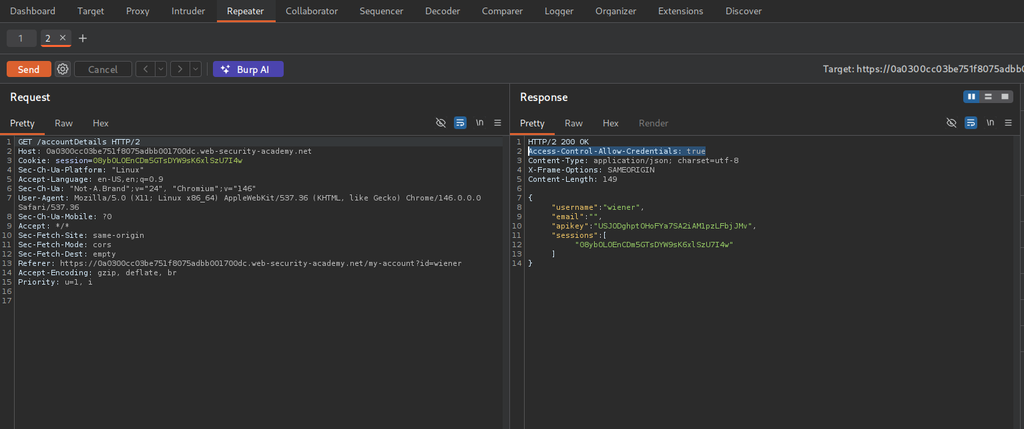
3. Send the request to Repeater and add Origin: https://example.com. The response now includes Access-Control-Allow-Origin: https://example.com, which confirms origin reflection.
4. Build the exploit on the lab’s exploit server. The script sends a credentialed request to /accountDetails and forwards the response to your server’s log.
5. Deliver the exploit to the victim, then check the access log for the administrator’s API key.
6. Submit the key to solve the lab.
Verifying Your Fix
After deploying changes, retest from the attacker’s side:
- Send a request with a random
Origin. The response should contain noAccess-Control-Allow-Originheader. - Send a request with
Origin: null. It should be rejected. - Send a request with a lookalike domain such as
https://app.example.com.evil.com. It should be rejected. - Send a request with each legitimate origin. Each should still work.
- Check that
Vary: Originis present on responses that depend on the origin.
Adding these checks to your automated tests stops the issue from coming back during future refactors.
Conclusion
A CORS vulnerability with basic origin reflection is easy to introduce and easy to exploit. It turns a convenience setting into a way to leak private data. The fix is simple: use an exact-match allowlist, never trust null, add Vary: Origin, and avoid combining permissive origins with credentials. Back that up with SameSite cookies and minimal data exposure. Audit your own endpoints today with the curl test above. If you hunt for bugs, practice on the PortSwigger lab and add origin reflection to your standard recon checklist.
If you are a cybersecurity enthusiast and interested in SQLi. Deep dive into SQL Injection vulnerabilities with the PortSwigger Lab case study.
FAQ
What is a CORS vulnerability with basic origin reflection?
It is a misconfiguration where the server copies the request’s Origin header into Access-Control-Allow-Origin, usually together with Access-Control-Allow-Credentials: true. Any website can then read authenticated responses.
Is Access-Control-Allow-Origin: * a vulnerability?
Not by itself. A wildcard cannot be used with credentialed requests, so it only exposes data that does not depend on a user’s session. It becomes a problem when it is used on endpoints that return sensitive data without authentication.
Does CORS stop CSRF attacks?
No. CORS controls which origins can read responses. It does not stop a browser from sending requests. Use anti-CSRF tokens and SameSite cookies for that.
How do I find origin reflection during a bug bounty test?
Send authenticated requests to sensitive endpoints with an arbitrary Origin header. Check whether the value is reflected in Access-Control-Allow-Origin and whether credentials are allowed. Also test null and lookalike domains.
Can I dynamically allow all subdomains safely?
Match the full hostname against an anchored, escaped pattern. Remember that a single subdomain with an XSS flaw or a takeover issue can then be used to attack the main application.
What is the difference between CORS and the Same-Origin Policy?
The Same-Origin Policy is the browser’s default rule that stops a page from reading responses from a different origin. CORS is the mechanism that lets a server relax that rule for specific, trusted origins.
Is it safe to reflect the Origin header if I validate it first?
Yes, as long as the validation is an exact match against an allowlist you control.